> ## Documentation Index
> Fetch the complete documentation index at: https://docs.oumi.ai/llms.txt
> Use this file to discover all available pages before exploring further.
# IMPORT OBSERVABILITY LOGS
> Turn Langfuse or LangSmith traces into a Conversation dataset you can train, evaluate, and synthesize with
Turn the Langfuse or LangSmith traces you already capture into a Conversation dataset, no ad hoc conversion code required. Oumi reconstructs each conversation into OpenAI wire format (system instructions, multi-turn structure, tool definitions and `tool_calls` preserved), and creates a Conversation dataset suitable for fine-tuning, evaluation, or synthesis workflows.
Oumi reconstructs conversations from LLM calls captured in OpenAI chat-completions shape: on Langfuse, a `GENERATION` whose JSON-encoded `input`/`output` are the request and response; on LangSmith, an `llm` run whose `inputs.messages` are OpenAI- or LangChain-style messages. Traces logged in other shapes (other providers' formats, custom structures, or non-chat steps) may import with missing content or be skipped, so confirm your trace shape with a small test import first.
Langfuse trace exports can be created directly from the tracing UI, whereas LangSmith trace exports must be created via the LangSmith SDK (more below).
| Platform | How you export | Format |
| ------------- | ------------------------------------------------------------------------ | ------------------------ |
| **Langfuse** | UI: **Tracing** tab > **Export** > **JSONL** | One observation per line |
| **LangSmith** | Small Python script using the LangSmith SDK (no UI export of raw traces) | One run per line |
Once you have your exported traces *in `.jsonl` format*, there are two ways to bring them into the platform:
* **Drag and drop** the file onto the **Datasets** page. Oumi detects the platform automatically.
* **The `Import Observability Logs` tile** under Create Dataset (here you can enter a dataset name, select the source platform, and disable deduplication of rows with matching prefixes).
## BEFORE YOU START
You will need:
* A Langfuse or LangSmith project with at least one traced run.
* For LangSmith, an API key with read access to that project. (Langfuse exports from the UI, no key needed.)
* An Oumi project where you can create datasets.
Start with a small test import (say, 20 traces) to confirm your traces parse cleanly before importing your full history.
## STEP 1: EXPORT FROM YOUR OBSERVABILITY PLATFORM
Pick the section for your platform.
### LANGFUSE (UI EXPORT)
In Langfuse, open the **Tracing** tab for your project.
Filter down to the traces you want (date range, session, tag, environment, user, trace attributes), then open **Export** and choose **As JSONL**. See Langfuse's [Export from UI guide](https://langfuse.com/docs/api-and-data-platform/features/export-from-ui).
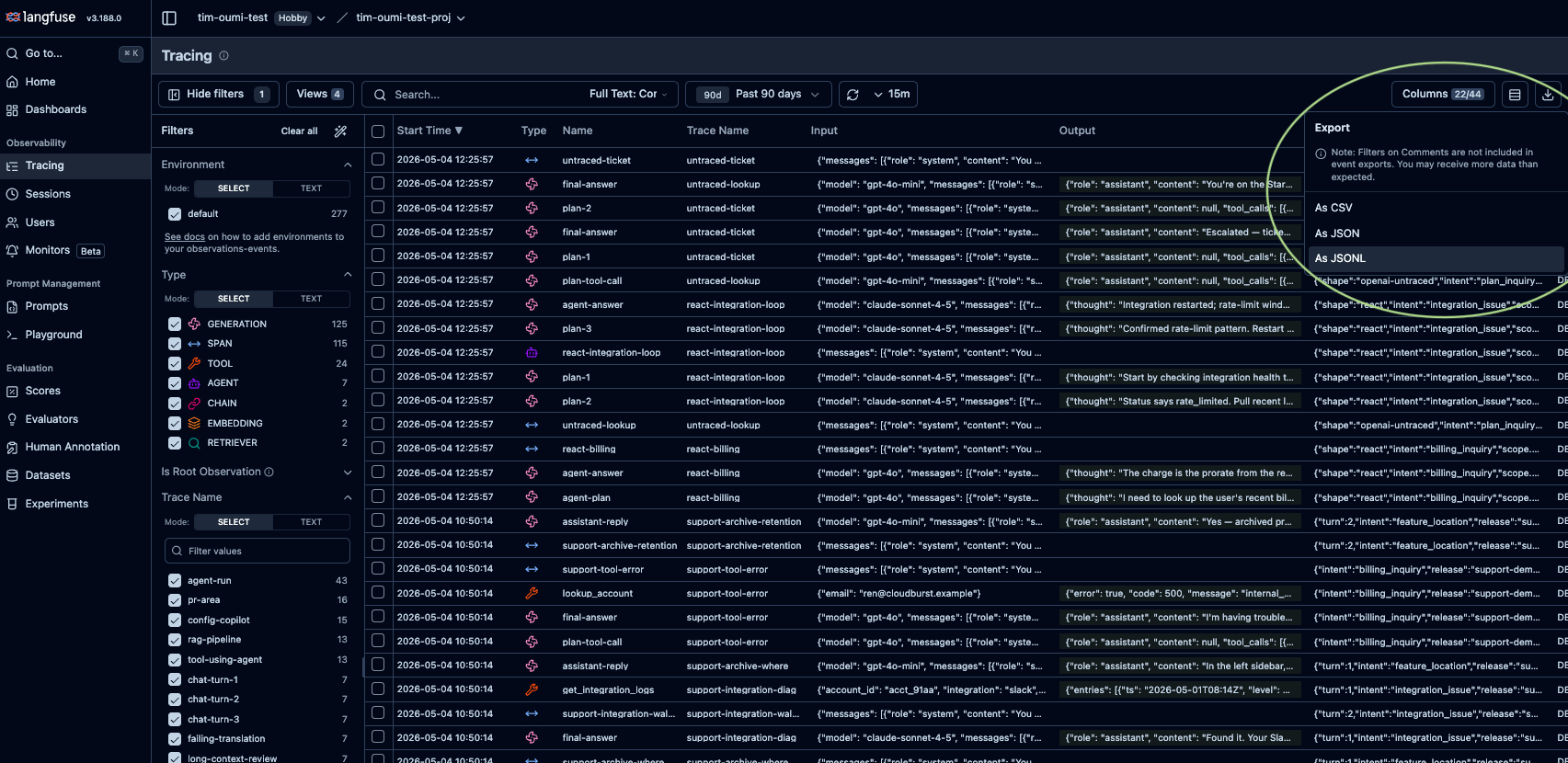 We currently accept only .jsonl trace exports, which contain all fields necessary to properly reconstruct tool definitions and invocations. Langfuse's "JSON" tree-view export is a different shape and is rejected at upload. Same for Datasets exported via the LangSmith UI.
Each line is one **observation**: a single step LangFuse recorded, such as a span, a generation, or a tool call. Observations from the same trace share a `traceId`, and LangFuse copies the trace-level fields onto every line so each row is self-contained. The example below is one trace made of a span and a generation whose response is a tool call:
```jsonl theme={null}
{"id":"obs_001","traceId":"trace_abc","traceName":"weather-agent","type":"SPAN","parentObservationId":null,"startTime":"2026-05-19T10:00:00.000Z","sessionId":null,"input":null,"output":null}
{"id":"obs_002","traceId":"trace_abc","traceName":"weather-agent","type":"GENERATION","parentObservationId":"obs_001","startTime":"2026-05-19T10:00:01.500Z","sessionId":null,"input":"{\"model\":\"gpt-4o\",\"messages\":[{\"role\":\"system\",\"content\":\"You are a weather assistant.\"},{\"role\":\"user\",\"content\":\"Will it rain in Paris tomorrow?\"}],\"tools\":[{\"type\":\"function\",\"function\":{\"name\":\"get_forecast\",\"parameters\":{\"type\":\"object\",\"properties\":{\"city\":{\"type\":\"string\"}}}}}]}","output":"{\"role\":\"assistant\",\"content\":null,\"tool_calls\":[{\"id\":\"call_1\",\"type\":\"function\",\"function\":{\"name\":\"get_forecast\",\"arguments\":\"{\\\"city\\\":\\\"Paris\\\"}\"}}]}"}
```
* `traceId` groups rows into one conversation.
* `type` can be `SPAN`, `GENERATION`, `TOOL`, etc. Oumi builds the conversation from `GENERATION` rows, with others retained as metadata.
* `input` and `output` are JSON-encoded strings, not nested objects (Langfuse's storage shape).
### LANGSMITH (API EXPORT)
The LangSmith UI has no one-click .jsonl export for raw traces, so you pull them with a small script using the LangSmith SDK. This produces a **raw trace export** (one `Run` per line, with `trace_id`, `parent_run_id`, `dotted_order`, and `run_type`), and the result imports to Oumi exactly like a Langfuse .jsonl.
LangSmith's UI **Add to Dataset > Download JSONL** produces a different shape (one example per row, no run linkage or retention of tool) for which import is not supported.
**1. Get an API key.** In LangSmith, open **Settings > API Keys** and create a key with read access to your project.
We currently accept only .jsonl trace exports, which contain all fields necessary to properly reconstruct tool definitions and invocations. Langfuse's "JSON" tree-view export is a different shape and is rejected at upload. Same for Datasets exported via the LangSmith UI.
Each line is one **observation**: a single step LangFuse recorded, such as a span, a generation, or a tool call. Observations from the same trace share a `traceId`, and LangFuse copies the trace-level fields onto every line so each row is self-contained. The example below is one trace made of a span and a generation whose response is a tool call:
```jsonl theme={null}
{"id":"obs_001","traceId":"trace_abc","traceName":"weather-agent","type":"SPAN","parentObservationId":null,"startTime":"2026-05-19T10:00:00.000Z","sessionId":null,"input":null,"output":null}
{"id":"obs_002","traceId":"trace_abc","traceName":"weather-agent","type":"GENERATION","parentObservationId":"obs_001","startTime":"2026-05-19T10:00:01.500Z","sessionId":null,"input":"{\"model\":\"gpt-4o\",\"messages\":[{\"role\":\"system\",\"content\":\"You are a weather assistant.\"},{\"role\":\"user\",\"content\":\"Will it rain in Paris tomorrow?\"}],\"tools\":[{\"type\":\"function\",\"function\":{\"name\":\"get_forecast\",\"parameters\":{\"type\":\"object\",\"properties\":{\"city\":{\"type\":\"string\"}}}}}]}","output":"{\"role\":\"assistant\",\"content\":null,\"tool_calls\":[{\"id\":\"call_1\",\"type\":\"function\",\"function\":{\"name\":\"get_forecast\",\"arguments\":\"{\\\"city\\\":\\\"Paris\\\"}\"}}]}"}
```
* `traceId` groups rows into one conversation.
* `type` can be `SPAN`, `GENERATION`, `TOOL`, etc. Oumi builds the conversation from `GENERATION` rows, with others retained as metadata.
* `input` and `output` are JSON-encoded strings, not nested objects (Langfuse's storage shape).
### LANGSMITH (API EXPORT)
The LangSmith UI has no one-click .jsonl export for raw traces, so you pull them with a small script using the LangSmith SDK. This produces a **raw trace export** (one `Run` per line, with `trace_id`, `parent_run_id`, `dotted_order`, and `run_type`), and the result imports to Oumi exactly like a Langfuse .jsonl.
LangSmith's UI **Add to Dataset > Download JSONL** produces a different shape (one example per row, no run linkage or retention of tool) for which import is not supported.
**1. Get an API key.** In LangSmith, open **Settings > API Keys** and create a key with read access to your project.
 **2. Install the SDK:**
```bash theme={null}
pip install 'langsmith>=0.1'
```
**3. Export the traces.** Set your LangSmith API key in the environment (`export LANGSMITH_API_KEY=lsv2_pt_...`), then run a script like the one below, adding [run filters](https://docs.smith.langchain.com/observability/how_to_guides/export_traces) to narrow what you pull:
```python theme={null}
import json
from langsmith import Client
PROJECT_NAME = "oumi-langsmith-project"
OUTPUT_PATH = "oumi-langsmith-export.jsonl"
client = Client() # reads LANGSMITH_API_KEY from env
# pulls every run for the project, optionally apply run filters
runs = client.list_runs(project_name=PROJECT_NAME)
with open(OUTPUT_PATH, "w") as f:
for run in runs:
# model_dump() on pydantic v2 SDKs, dict() on older v1 ones
data = run.model_dump() if hasattr(run, "model_dump") else run.dict()
f.write(json.dumps(data, default=str) + "\n")
```
Each line of the .jsonl will be one run (`chain`, `llm`, or `tool`) carrying `trace_id`, `parent_run_id`, `dotted_order`, and `run_type`. Oumi groups runs by `trace_id`, picks the `llm` run with the most messages, and rebuilds the conversation from that run's `inputs.messages` (tool results already appear there as `tool` turns) plus its `outputs`. Example:
```jsonl theme={null}
{"id":"run_root","trace_id":"trace_abc","parent_run_id":null,"dotted_order":"20260519T100000000000Zrun_root","run_type":"chain","name":"weather-agent","start_time":"2026-05-19 10:00:00.000000","inputs":{},"outputs":{}}
{"id":"run_llm","trace_id":"trace_abc","parent_run_id":"run_root","dotted_order":"20260519T100000000000Zrun_root.20260519T100001500000Zrun_llm","run_type":"llm","name":"final-answer","start_time":"2026-05-19 10:00:01.500000","inputs":{"messages":[{"role":"system","content":"You are a weather assistant."},{"role":"user","content":"Will it rain in Paris tomorrow?"}],"tools":[{"type":"function","function":{"name":"get_forecast","parameters":{"type":"object","properties":{"city":{"type":"string"}}}}}]},"outputs":{"role":"assistant","content":null,"tool_calls":[{"id":"call_1","type":"function","function":{"name":"get_forecast","arguments":"{\"city\":\"Paris\"}"}}]}}
```
* `trace_id` groups runs into one conversation; `parent_run_id` and `dotted_order` give the run tree and its order.
* Unlike the Langfuse example above, `inputs` and `outputs` here are real nested objects, not stringified json.
* Session threading reads `extra.metadata.session_id`, not the top-level `session_id` (that's the tracing-project ID).
Pulling a whole project can be slow. Bound it with the `start_time` / `end_time` parameters on `list_runs`, and run in chunks if needed. Filtering examples can be found at [https://docs.smith.langchain.com/observability/how\_to\_guides/export\_traces](https://docs.smith.langchain.com/observability/how_to_guides/export_traces)
## STEP 2: IMPORT INTO OUMI
Bring your traces into the platform from the **Datasets** page.
### OPTION A: DRAG AND DROP (QUICKEST)
Open the **Datasets** page and drop your `.jsonl` onto the upload zone above the table.
Oumi recognizes Langfuse and LangSmith trace exports automatically, so no need to specify the source platform. The import runs in the background, and the new dataset appears in the list when parsing completes.
Deduplication is always on for this path: when one conversation's turns are a prefix of a longer one, only the longest is kept. Use Option B if you want to retain both.
### OPTION B: THE IMPORT OBSERVABILITY LOGS TILE (FULL CONTROL)
Use this to name the dataset (optionally), declare the platform, or turn dedupe off.
Open the **Datasets** page, click `Create Dataset`, and select the `Import Observability Logs` tile in the Builder.
Fill out the four fields:
| Field | What to enter |
| --------------------------------- | --------------------------------------------------------------------- |
| `Dataset Name` | A human-readable name (up to 128 characters). |
| `Source Platform` | `Langfuse` or `LangSmith`, matching your export. |
| `File` | The `.jsonl` from Step 1. Drag-drop or click to select. |
| `Deduplicate prefix-overlap rows` | Leave on (default) unless you have a reason not to. See next section. |
Then click `Import Logs`. Oumi parses the export in the background and returns you to the **Datasets** page; a few thousand traces usually finish in under a minute.
**Deduplicating prefix-overlap rows** (on by default) keeps only the most complete version of each conversation. Agents often log incrementally (a trace after turn 1, another containing turns 1 and 2, and so on), so one conversation can appear as several traces where each is a prefix of the next. Deduplication detects when one trace is a prefix of another, and keeps only the longest. Leave it on unless you have a strong reason to keep both partial and complete examples from a single session.
## WHAT YOU GET
A Conversation dataset where each row is one accepted trace (after dedupe):
* Messages in OpenAI wire format (`system`, `user`, `assistant`, `tool`), in trace order.
* `tool_calls` and `tool_call_id` preserved on the relevant turns (see the [OpenAI tool-calling spec](https://platform.openai.com/docs/guides/function-calling)).
* The originating `tools` array, when present.
* Multi-turn structure intact, never flattened to a single pair.
Each conversation also carries metadata: `source_platform`, `source_trace_id`, `source_trace_name`, `source_session_id` (if present), `source_sequence_key` (the root trace's start time, for in-session ordering), and `source_raw` (the full original trace as a JSON string, for fields Oumi didn't promote).
Nothing from the original trace is dropped: anything Oumi doesn't promote to a `source_*` field, such as per-span timings, costs, model names, prompt-template metadata, and platform user IDs, is preserved verbatim inside `source_raw`.
## USE THE DATASET
The new dataset behaves like any other Conversation dataset:
* **Fine-tune** on it. See [Training](/guides/training).
* **Evaluate** against it. See [Evaluations](/guides/evaluations).
* **Synthesize** from it as a synthesis input. See [Data synthesis](/guides/synthesis).
## LIMITATIONS
* **JSONL only.** Other formats (Langfuse's JSON tree or CSV; LangSmith's "Add to Dataset" exports) aren't supported.
* **Langfuse and LangSmith only.** OpenTelemetry is on the roadmap.
* **Dedupe turns off only on the tile.** Drag-and-drop always dedupes.
* **One new dataset per import.** No appending; re-import to merge.
* **No preview or in-app editing.** To fix a bad export, re-export and re-import.
* **Max 1000 messages per conversation.** Longer traces are dropped; the rest of the file still imports.
## TROUBLESHOOTING
| What you see | What it means | What to do |
| ----------------------------------------------------------------------------------------------------------------- | --------------------------------------------------------------------------------------------------------------------------------------------------------------------------------------------------------- | ------------------------------------------------------------------------------------------------------------------------------------------------------------------ |
| "... import only supports `.jsonl` files" (or the file picker rejects your file) | The upload isn't JSONL (probably Langfuse's JSON tree export, or a CSV). | Re-export as JSONL: Langfuse's **Tracing** tab JSONL option, or the LangSmith script in Step 1. |
| "This file looks like a LangSmith dataset export ... Use the LangSmith API trace export, not the dataset export." | You used LangSmith's **Add to Dataset > Download JSONL**, which has no run linkage. | Re-export with the API trace script in Step 1. |
| "File too large" | Your export exceeds the project's dataset quota. | Split by date range, session, or tag and re-run. For LangSmith, pass `start_time` / `end_time` to `list_runs`. |
| "No convertible conversations found in the uploaded file" | The export has no model generations (no `GENERATION` in Langfuse, no `llm` run in LangSmith), no trace had an assistant turn, or the LLM calls weren't logged in a supported OpenAI/LangChain chat shape. | Confirm you exported actual model calls (not just spans or tool events), and that those calls were captured in OpenAI chat-completions or LangChain message shape. |
| Fewer conversations than expected | Dedupe collapsed prefix overlaps; traces with no assistant turn, or over 1000 messages, are also dropped. | To keep intermediate turns, re-import through the tile with dedupe off. |
| Dropped file landed under **Files**, or imported as the wrong type | Drag-and-drop didn't recognize it as a trace export. | Confirm it's a raw trace export (Step 1), or use the tile, which declares the platform explicitly. |
| "Upload timed out" | The presigned upload URL expired mid-upload. | Retry, or split the file if it keeps timing out. |
| LangSmith script returns no runs | `LANGSMITH_API_KEY` is unset or scoped to the wrong workspace, or `PROJECT_NAME` is wrong. | Check the env var, the workspace in LangSmith Settings, and the exact project name. |
## FAQ
No. Importing is read-only; your traces stay where they are.
Everything in your .jsonl trace export will be retained as metadata in the converted conversation dataset. Be sure to strip, redact, or filter out anything sensitive before exporting from Langfuse/LangSmith.
No. It runs within a single import, so re-importing overlapping data produces a new dataset, which may overlap with existing datasets.
It samples rows for each platform's signature fields. A genuine trace export is unambiguous.
Not yet. Use the API trace export in Step 1.
No. Each import targets a single platform. Run two imports and combine the datasets downstream.
**2. Install the SDK:**
```bash theme={null}
pip install 'langsmith>=0.1'
```
**3. Export the traces.** Set your LangSmith API key in the environment (`export LANGSMITH_API_KEY=lsv2_pt_...`), then run a script like the one below, adding [run filters](https://docs.smith.langchain.com/observability/how_to_guides/export_traces) to narrow what you pull:
```python theme={null}
import json
from langsmith import Client
PROJECT_NAME = "oumi-langsmith-project"
OUTPUT_PATH = "oumi-langsmith-export.jsonl"
client = Client() # reads LANGSMITH_API_KEY from env
# pulls every run for the project, optionally apply run filters
runs = client.list_runs(project_name=PROJECT_NAME)
with open(OUTPUT_PATH, "w") as f:
for run in runs:
# model_dump() on pydantic v2 SDKs, dict() on older v1 ones
data = run.model_dump() if hasattr(run, "model_dump") else run.dict()
f.write(json.dumps(data, default=str) + "\n")
```
Each line of the .jsonl will be one run (`chain`, `llm`, or `tool`) carrying `trace_id`, `parent_run_id`, `dotted_order`, and `run_type`. Oumi groups runs by `trace_id`, picks the `llm` run with the most messages, and rebuilds the conversation from that run's `inputs.messages` (tool results already appear there as `tool` turns) plus its `outputs`. Example:
```jsonl theme={null}
{"id":"run_root","trace_id":"trace_abc","parent_run_id":null,"dotted_order":"20260519T100000000000Zrun_root","run_type":"chain","name":"weather-agent","start_time":"2026-05-19 10:00:00.000000","inputs":{},"outputs":{}}
{"id":"run_llm","trace_id":"trace_abc","parent_run_id":"run_root","dotted_order":"20260519T100000000000Zrun_root.20260519T100001500000Zrun_llm","run_type":"llm","name":"final-answer","start_time":"2026-05-19 10:00:01.500000","inputs":{"messages":[{"role":"system","content":"You are a weather assistant."},{"role":"user","content":"Will it rain in Paris tomorrow?"}],"tools":[{"type":"function","function":{"name":"get_forecast","parameters":{"type":"object","properties":{"city":{"type":"string"}}}}}]},"outputs":{"role":"assistant","content":null,"tool_calls":[{"id":"call_1","type":"function","function":{"name":"get_forecast","arguments":"{\"city\":\"Paris\"}"}}]}}
```
* `trace_id` groups runs into one conversation; `parent_run_id` and `dotted_order` give the run tree and its order.
* Unlike the Langfuse example above, `inputs` and `outputs` here are real nested objects, not stringified json.
* Session threading reads `extra.metadata.session_id`, not the top-level `session_id` (that's the tracing-project ID).
Pulling a whole project can be slow. Bound it with the `start_time` / `end_time` parameters on `list_runs`, and run in chunks if needed. Filtering examples can be found at [https://docs.smith.langchain.com/observability/how\_to\_guides/export\_traces](https://docs.smith.langchain.com/observability/how_to_guides/export_traces)
## STEP 2: IMPORT INTO OUMI
Bring your traces into the platform from the **Datasets** page.
### OPTION A: DRAG AND DROP (QUICKEST)
Open the **Datasets** page and drop your `.jsonl` onto the upload zone above the table.
Oumi recognizes Langfuse and LangSmith trace exports automatically, so no need to specify the source platform. The import runs in the background, and the new dataset appears in the list when parsing completes.
Deduplication is always on for this path: when one conversation's turns are a prefix of a longer one, only the longest is kept. Use Option B if you want to retain both.
### OPTION B: THE IMPORT OBSERVABILITY LOGS TILE (FULL CONTROL)
Use this to name the dataset (optionally), declare the platform, or turn dedupe off.
Open the **Datasets** page, click `Create Dataset`, and select the `Import Observability Logs` tile in the Builder.
Fill out the four fields:
| Field | What to enter |
| --------------------------------- | --------------------------------------------------------------------- |
| `Dataset Name` | A human-readable name (up to 128 characters). |
| `Source Platform` | `Langfuse` or `LangSmith`, matching your export. |
| `File` | The `.jsonl` from Step 1. Drag-drop or click to select. |
| `Deduplicate prefix-overlap rows` | Leave on (default) unless you have a reason not to. See next section. |
Then click `Import Logs`. Oumi parses the export in the background and returns you to the **Datasets** page; a few thousand traces usually finish in under a minute.
**Deduplicating prefix-overlap rows** (on by default) keeps only the most complete version of each conversation. Agents often log incrementally (a trace after turn 1, another containing turns 1 and 2, and so on), so one conversation can appear as several traces where each is a prefix of the next. Deduplication detects when one trace is a prefix of another, and keeps only the longest. Leave it on unless you have a strong reason to keep both partial and complete examples from a single session.
## WHAT YOU GET
A Conversation dataset where each row is one accepted trace (after dedupe):
* Messages in OpenAI wire format (`system`, `user`, `assistant`, `tool`), in trace order.
* `tool_calls` and `tool_call_id` preserved on the relevant turns (see the [OpenAI tool-calling spec](https://platform.openai.com/docs/guides/function-calling)).
* The originating `tools` array, when present.
* Multi-turn structure intact, never flattened to a single pair.
Each conversation also carries metadata: `source_platform`, `source_trace_id`, `source_trace_name`, `source_session_id` (if present), `source_sequence_key` (the root trace's start time, for in-session ordering), and `source_raw` (the full original trace as a JSON string, for fields Oumi didn't promote).
Nothing from the original trace is dropped: anything Oumi doesn't promote to a `source_*` field, such as per-span timings, costs, model names, prompt-template metadata, and platform user IDs, is preserved verbatim inside `source_raw`.
## USE THE DATASET
The new dataset behaves like any other Conversation dataset:
* **Fine-tune** on it. See [Training](/guides/training).
* **Evaluate** against it. See [Evaluations](/guides/evaluations).
* **Synthesize** from it as a synthesis input. See [Data synthesis](/guides/synthesis).
## LIMITATIONS
* **JSONL only.** Other formats (Langfuse's JSON tree or CSV; LangSmith's "Add to Dataset" exports) aren't supported.
* **Langfuse and LangSmith only.** OpenTelemetry is on the roadmap.
* **Dedupe turns off only on the tile.** Drag-and-drop always dedupes.
* **One new dataset per import.** No appending; re-import to merge.
* **No preview or in-app editing.** To fix a bad export, re-export and re-import.
* **Max 1000 messages per conversation.** Longer traces are dropped; the rest of the file still imports.
## TROUBLESHOOTING
| What you see | What it means | What to do |
| ----------------------------------------------------------------------------------------------------------------- | --------------------------------------------------------------------------------------------------------------------------------------------------------------------------------------------------------- | ------------------------------------------------------------------------------------------------------------------------------------------------------------------ |
| "... import only supports `.jsonl` files" (or the file picker rejects your file) | The upload isn't JSONL (probably Langfuse's JSON tree export, or a CSV). | Re-export as JSONL: Langfuse's **Tracing** tab JSONL option, or the LangSmith script in Step 1. |
| "This file looks like a LangSmith dataset export ... Use the LangSmith API trace export, not the dataset export." | You used LangSmith's **Add to Dataset > Download JSONL**, which has no run linkage. | Re-export with the API trace script in Step 1. |
| "File too large" | Your export exceeds the project's dataset quota. | Split by date range, session, or tag and re-run. For LangSmith, pass `start_time` / `end_time` to `list_runs`. |
| "No convertible conversations found in the uploaded file" | The export has no model generations (no `GENERATION` in Langfuse, no `llm` run in LangSmith), no trace had an assistant turn, or the LLM calls weren't logged in a supported OpenAI/LangChain chat shape. | Confirm you exported actual model calls (not just spans or tool events), and that those calls were captured in OpenAI chat-completions or LangChain message shape. |
| Fewer conversations than expected | Dedupe collapsed prefix overlaps; traces with no assistant turn, or over 1000 messages, are also dropped. | To keep intermediate turns, re-import through the tile with dedupe off. |
| Dropped file landed under **Files**, or imported as the wrong type | Drag-and-drop didn't recognize it as a trace export. | Confirm it's a raw trace export (Step 1), or use the tile, which declares the platform explicitly. |
| "Upload timed out" | The presigned upload URL expired mid-upload. | Retry, or split the file if it keeps timing out. |
| LangSmith script returns no runs | `LANGSMITH_API_KEY` is unset or scoped to the wrong workspace, or `PROJECT_NAME` is wrong. | Check the env var, the workspace in LangSmith Settings, and the exact project name. |
## FAQ
No. Importing is read-only; your traces stay where they are.
Everything in your .jsonl trace export will be retained as metadata in the converted conversation dataset. Be sure to strip, redact, or filter out anything sensitive before exporting from Langfuse/LangSmith.
No. It runs within a single import, so re-importing overlapping data produces a new dataset, which may overlap with existing datasets.
It samples rows for each platform's signature fields. A genuine trace export is unambiguous.
Not yet. Use the API trace export in Step 1.
No. Each import targets a single platform. Run two imports and combine the datasets downstream.