HOW TOOL IMPLEMENTATIONS WORK
When a model calls a tool during a job, Oumi passes the call to the implementation that the job attached for that tool. The implementation produces one of two results:- An output. The model reads it as the tool’s answer. If the tool declares an output schema, Oumi checks the output against it.
- A refusal. The tool rejects the call in its own words, for example a lookup table with no matching row, an endpoint that answers with a 4xx status, or a simulated output that doesn’t match the output schema. The model reads the refusal message as the tool’s answer and decides what to do next.
Duplicate. Oumi prefills a new implementation of the same type.
Oumi opens the form for a tool’s first implementation as soon as you create the tool. To add another implementation later, open the tool’s page and click Create implementation in the Implementations section. See Tool implementation schema.
CHOOSING A TYPE
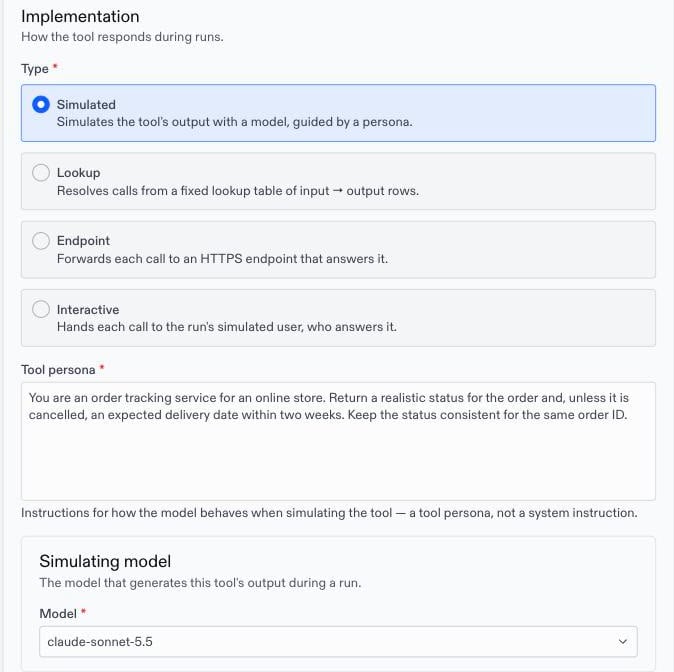
Answer these questions in order and stop at the first yes:- Does the tool already exist as a real service that you can reach over HTTP or MCP? Use endpoint. It returns real outputs, so prefer it when it is available.
- Does the tool ask the user something, such as a clarifying question, a confirmation, or a short choice? Use interactive.
- Are all of the tool’s outputs known in advance and few enough to list? Use lookup.
- Otherwise, use simulated.
ENDPOINT
An endpoint implementation forwards each call to your service at a public HTTPS URL. It speaks one of two protocols:- HTTP sends one request per call. You choose the method.
POST,PUT, andPATCHsend the arguments as the JSON body.GETandDELETEsend them as query parameters.POSTis the default. - MCP calls your service as an MCP server over Streamable HTTP.
INTERACTIVE
An interactive implementation hands each call to the simulated user who drives the conversation. The user’s reply becomes the tool’s output. Use it for tools that get a quick reply from the user, not for tools that fetch data. It has no configuration of its own, but it has two requirements:- Add a simulated user to any job that attaches it, in the job’s User Model section.
- The tool’s output schema must fit one short reply. It must be an object with exactly one string property, and it cannot require any other property. A tool with no output schema also works. Oumi rejects an interactive implementation for any other schema.
LOOKUP
A lookup implementation holds a table of rows. Each row has aninput, the tool arguments it matches, and an output, the value it returns. A call returns a row’s output only when its arguments exactly match that row’s input, after Oumi fills in any defaults from the parameter schema. A call that matches no row is refused, so the model reads an error instead of an output. Each input must be unique, and the table needs at least one row.
SIMULATED
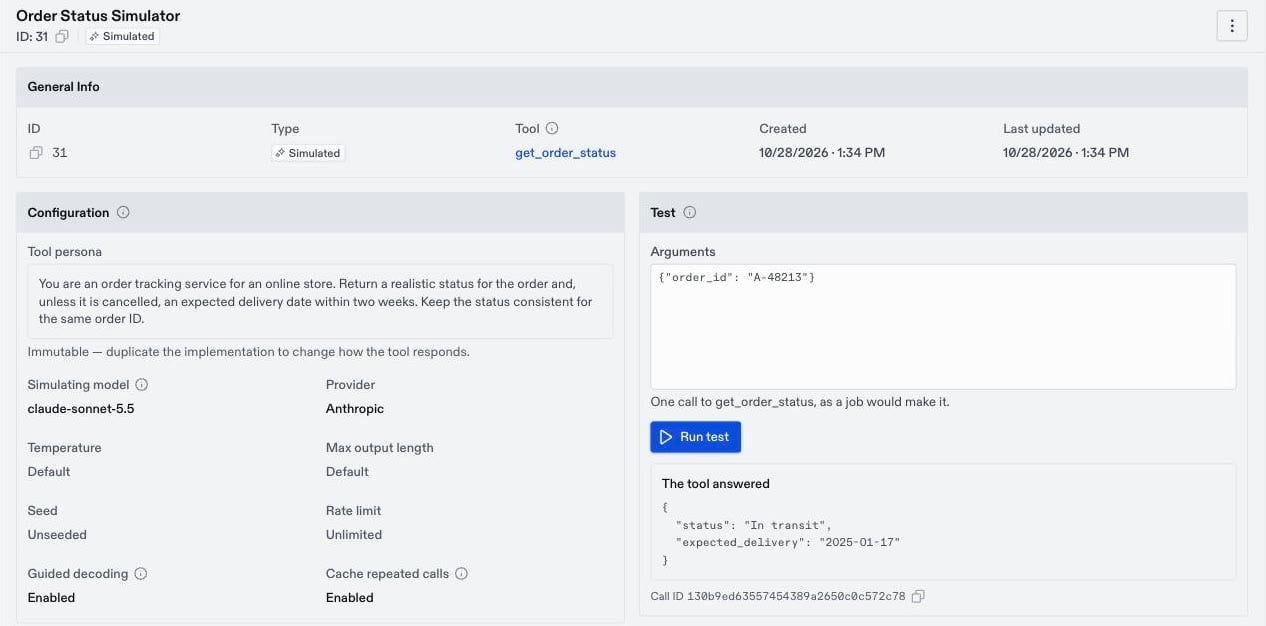
A simulated implementation sends each call to a model, which invents a plausible output. You write a tool persona that tells the model how the tool behaves, such as its response style, how realistic its values are, and how it handles edge cases. Do not repeat the tool’s name, description, parameters, or output schema in the persona. Oumi gives these to the model already. The simulating model sees your persona, the tool’s definition, and the arguments of one call. It doesn’t see the conversation or earlier calls. Pick a capable model. A weak model simulates tools poorly. Two options are on by default:- Guided decoding constrains the generated output to the tool’s output schema. Turn it off when the schema is so large that constraining it is slow or unsupported. Oumi still checks the output against the schema after generation.
- Cache repeated calls returns the earlier result when a call repeats the same arguments, instead of simulating it again.
TEST AN IMPLEMENTATION
Run a few calls through a new implementation before you use it in a job. Try success cases, each use case you expect, failures, and empty inputs. Testing matters most for simulated implementations. Adjust the persona and test again until the outputs look right. A fix here is cheaper than a fix after a full job. On the implementation’s page, enter the arguments in the Test card and clickRun test. The card shows the tool’s output, the tool’s refusal, or why the call failed. A lookup refusal in a test lists the table’s inputs, but in a job the model reads only that no record matches.