

tool_calls preserved), and creates a Conversation dataset suitable for fine-tuning, evaluation, or synthesis workflows.
Oumi reconstructs conversations from LLM calls captured in OpenAI chat-completions shape: on Langfuse, a
GENERATION whose JSON-encoded input/output are the request and response; on LangSmith, an llm run whose inputs.messages are OpenAI- or LangChain-style messages. Traces logged in other shapes (other providers’ formats, custom structures, or non-chat steps) may import with missing content or be skipped, so confirm your trace shape with a small test import first.
Once you have your exported traces in
.jsonl format, there are two ways to bring them into the platform:
- Drag and drop the file onto the Datasets page. Oumi detects the platform automatically.
- The
Import Observability Logstile under Create Dataset (here you can enter a dataset name, select the source platform, and disable deduplication of rows with matching prefixes).
BEFORE YOU START
You will need:- A Langfuse or LangSmith project with at least one traced run.
- For LangSmith, an API key with read access to that project. (Langfuse exports from the UI, no key needed.)
- An Oumi project where you can create datasets.
STEP 1: EXPORT FROM YOUR OBSERVABILITY PLATFORM
Pick the section for your platform.LANGFUSE (UI EXPORT)
In Langfuse, open the Tracing tab for your project. Filter down to the traces you want (date range, session, tag, environment, user, trace attributes), then open Export and choose As JSONL. See Langfuse’s Export from UI guide.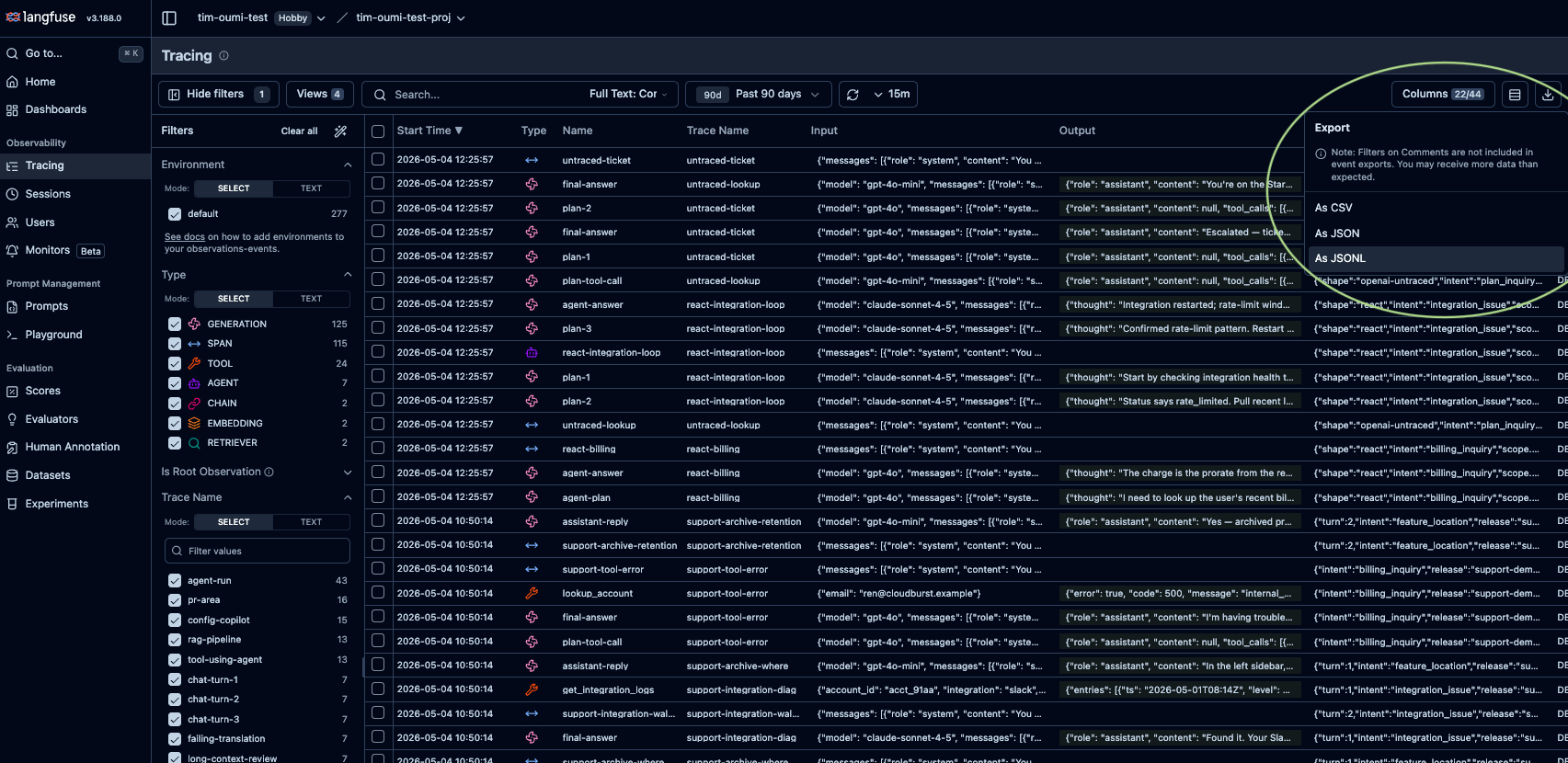
We currently accept only .jsonl trace exports, which contain all fields necessary to properly reconstruct tool definitions and invocations. Langfuse’s “JSON” tree-view export is a different shape and is rejected at upload. Same for Datasets exported via the LangSmith UI.
traceId, and LangFuse copies the trace-level fields onto every line so each row is self-contained. The example below is one trace made of a span and a generation whose response is a tool call:
traceIdgroups rows into one conversation.typecan beSPAN,GENERATION,TOOL, etc. Oumi builds the conversation fromGENERATIONrows, with others retained as metadata.inputandoutputare JSON-encoded strings, not nested objects (Langfuse’s storage shape).
LANGSMITH (API EXPORT)
The LangSmith UI has no one-click .jsonl export for raw traces, so you pull them with a small script using the LangSmith SDK. This produces a raw trace export (oneRun per line, with trace_id, parent_run_id, dotted_order, and run_type), and the result imports to Oumi exactly like a Langfuse .jsonl.
1. Get an API key. In LangSmith, open Settings > API Keys and create a key with read access to your project.

export LANGSMITH_API_KEY=lsv2_pt_...), then run a script like the one below, adding run filters to narrow what you pull:
chain, llm, or tool) carrying trace_id, parent_run_id, dotted_order, and run_type. Oumi groups runs by trace_id, picks the llm run with the most messages, and rebuilds the conversation from that run’s inputs.messages (tool results already appear there as tool turns) plus its outputs. Example:
trace_idgroups runs into one conversation;parent_run_idanddotted_ordergive the run tree and its order.- Unlike the Langfuse example above,
inputsandoutputshere are real nested objects, not stringified json. - Session threading reads
extra.metadata.session_id, not the top-levelsession_id(that’s the tracing-project ID).
STEP 2: IMPORT INTO OUMI
Bring your traces into the platform from the Datasets page.OPTION A: DRAG AND DROP (QUICKEST)
Open the Datasets page and drop your.jsonl onto the upload zone above the table.
Oumi recognizes Langfuse and LangSmith trace exports automatically, so no need to specify the source platform. The import runs in the background, and the new dataset appears in the list when parsing completes.
Deduplication is always on for this path: when one conversation’s turns are a prefix of a longer one, only the longest is kept. Use Option B if you want to retain both.
OPTION B: THE IMPORT OBSERVABILITY LOGS TILE (FULL CONTROL)
Use this to name the dataset (optionally), declare the platform, or turn dedupe off. Open the Datasets page, clickCreate Dataset, and select the Import Observability Logs tile in the Builder.
Fill out the four fields:
Then click
Import Logs. Oumi parses the export in the background and returns you to the Datasets page; a few thousand traces usually finish in under a minute.
WHAT YOU GET
A Conversation dataset where each row is one accepted trace (after dedupe):- Messages in OpenAI wire format (
system,user,assistant,tool), in trace order. tool_callsandtool_call_idpreserved on the relevant turns (see the OpenAI tool-calling spec).- The originating
toolsarray, when present. - Multi-turn structure intact, never flattened to a single pair.
source_platform, source_trace_id, source_trace_name, source_session_id (if present), source_sequence_key (the root trace’s start time, for in-session ordering), and source_raw (the full original trace as a JSON string, for fields Oumi didn’t promote).
Nothing from the original trace is dropped: anything Oumi doesn’t promote to a source_* field, such as per-span timings, costs, model names, prompt-template metadata, and platform user IDs, is preserved verbatim inside source_raw.
USE THE DATASET
The new dataset behaves like any other Conversation dataset:- Fine-tune on it. See Training.
- Evaluate against it. See Evaluations.
- Synthesize from it as a synthesis input. See Data synthesis.
LIMITATIONS
- JSONL only. Other formats (Langfuse’s JSON tree or CSV; LangSmith’s “Add to Dataset” exports) aren’t supported.
- Langfuse and LangSmith only. OpenTelemetry is on the roadmap.
- Dedupe turns off only on the tile. Drag-and-drop always dedupes.
- One new dataset per import. No appending; re-import to merge.
- No preview or in-app editing. To fix a bad export, re-export and re-import.
- Max 1000 messages per conversation. Longer traces are dropped; the rest of the file still imports.
TROUBLESHOOTING
FAQ
Does Oumi change my traces in Langfuse or LangSmith?
Does Oumi change my traces in Langfuse or LangSmith?
No. Importing is read-only; your traces stay where they are.
Will PII from my traces end up in the dataset?
Will PII from my traces end up in the dataset?
Everything in your .jsonl trace export will be retained as metadata in the converted conversation dataset. Be sure to strip, redact, or filter out anything sensitive before exporting from Langfuse/LangSmith.
Does dedupe look across imports?
Does dedupe look across imports?
No. It runs within a single import, so re-importing overlapping data produces a new dataset, which may overlap with existing datasets.
How does drag-and-drop detect the platform?
How does drag-and-drop detect the platform?
It samples rows for each platform’s signature fields. A genuine trace export is unambiguous.
Can I import LangSmith dataset exports (Add to Dataset > Download JSONL)?
Can I import LangSmith dataset exports (Add to Dataset > Download JSONL)?
Not yet. Use the API trace export in Step 1.
Can I mix Langfuse and LangSmith traces in one import?
Can I mix Langfuse and LangSmith traces in one import?
No. Each import targets a single platform. Run two imports and combine the datasets downstream.