

Create Evaluator, and choose Classification Evaluator or Extraction Evaluator. To save it, click the Save icon, enter a name, and click Save Evaluator.
CREATE A CLASSIFICATION EVALUATOR
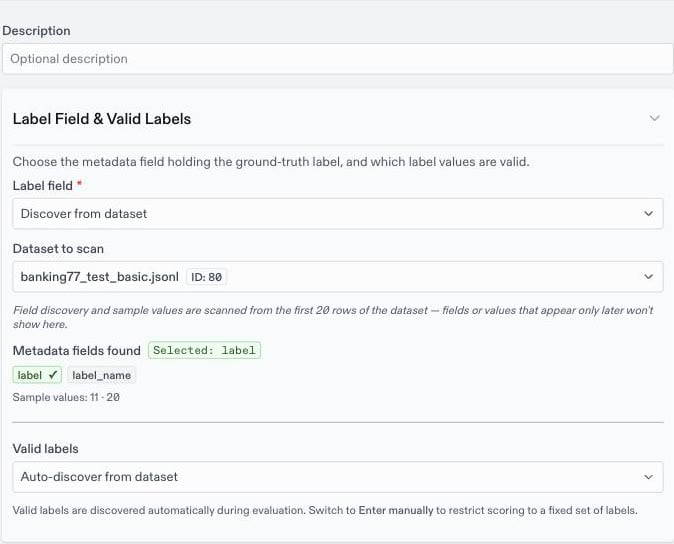
Use a classification evaluator when the model picks one label from a fixed set, such as an intent, a sentiment, or a category. Each row’s metadata must hold the correct label.- Under Label field, choose the metadata field that holds the correct label. With
Discover from dataset, pick a dataset and click one of the fields Oumi finds. WithEnter manually, type the field’s key. - Under Valid labels, keep
Auto-discover from datasetto use every label that appears as a correct answer. ChooseEnter manuallyto restrict scoring to a fixed set, for example when the dataset doesn’t contain every label. - Optionally, under Label Extraction Mode, choose how Oumi finds the predicted label in the response:
Auto (recommended): Tries an exact match first, then looks for a label as a whole word in the response. It suits most tasks, including short and numeric labels.Exact match only: The whole response must equal a valid label. Use it for a fine-tuned model that returns only the label.Substring match: Matches a label anywhere in the response. Use it when labels are phrases of several words.
- Click the
Saveicon, enter a name, and clickSave Evaluator.
HOW ROWS ARE SCORED
Oumi finds the predicted label in the model’s last response, using the extraction mode, and compares it with the correct label. The comparison ignores case. A row passes only on an exact match. A row whose response contains no valid label, or whose correct label is missing, can’t be scored, and it is left out of the metrics.CLASSIFICATION RESULTS
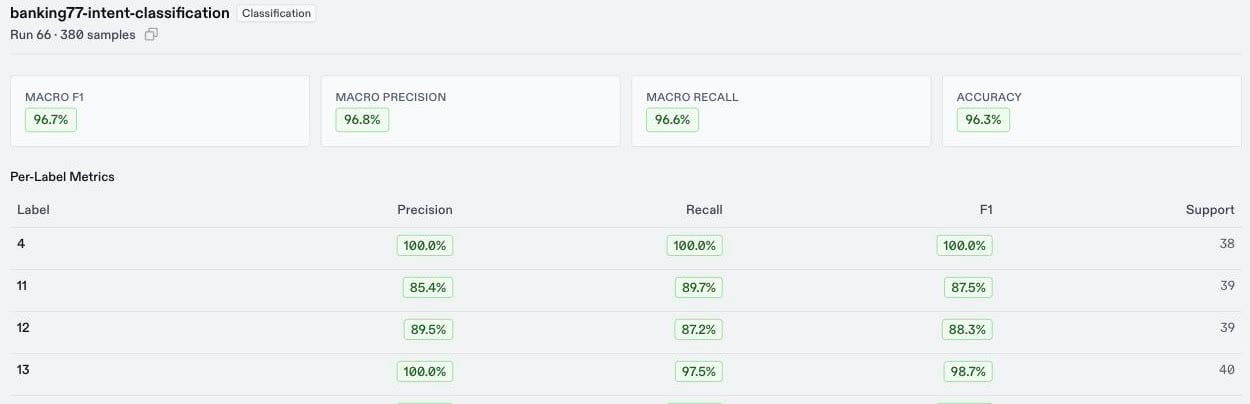
A classification evaluator reports more than one score, so you can see which labels the model gets wrong:- Macro F1: The headline score. It averages the F1 score of every label, so a rare label counts as much as a common one.
- Macro precision, macro recall, and accuracy.
- Per-label metrics: Precision, recall, F1, and the number of rows for each label.
- Top confusions: The pairs of labels the model mixes up most often.
- Confusion matrix: Each row is a correct label and each column a predicted label, so every number off the diagonal is a mistake. It appears when the evaluation has a small number of labels.
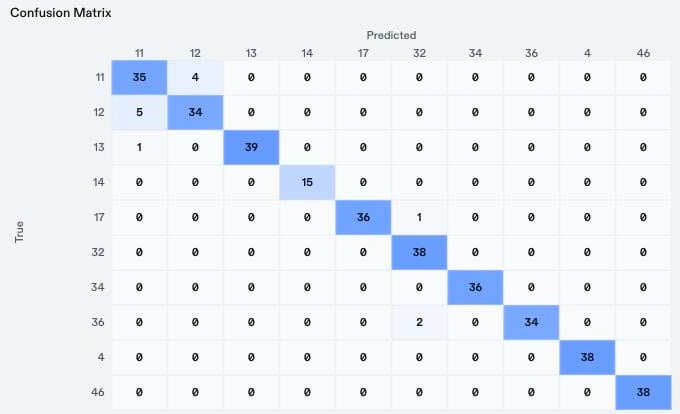
11, card_arrival, with intent 12, card_delivery_estimate, in both directions. That points to a specific fix: training data that separates the two intents.
CREATE AN EXTRACTION EVALUATOR
Use an extraction evaluator when the model extracts information instead of picking a label. Choose the mode that matches your task: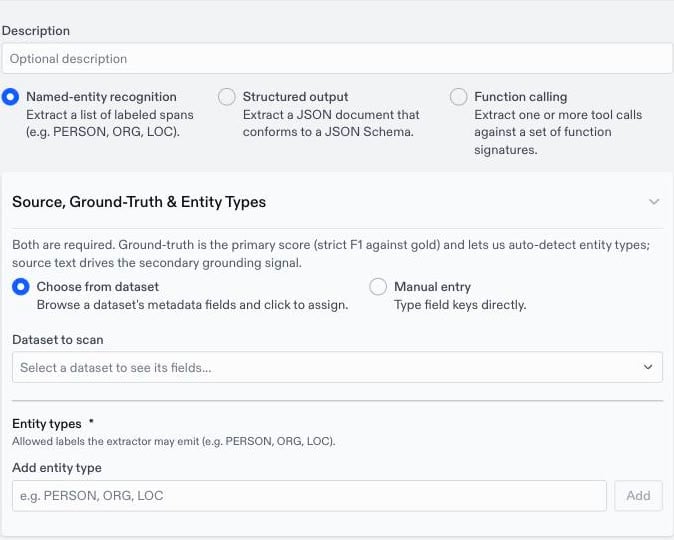
- Choose the mode.
- Point the evaluator at your metadata fields, with
Choose from datasetorManual entry:- Ground-truth field: The field that holds the correct answer. Every mode needs it.
- Source text field: The field that holds the text the model extracted from. Named-entity recognition and structured output use it to check that each extracted value appears in the source.
- Fill in the mode’s settings:
- Named-entity recognition: Add the
Entity typesthe model may return, such asPERSONorORG. Oumi can suggest them from the ground-truth field. - Structured output: Paste the
JSON Schemathe output must follow. Under Advanced settings, choose whether1and"1"count as the same value, and whether anullvalue differs from a missing key. Under Check for Groundedness, turn off fields whose values aren’t expected to appear in the source text, such as IDs or booleans. - Function calling: Add each function the model may call, with its
Function nameand the JSON Schema of its parameters.
- Named-entity recognition: Add the
- Click the
Saveicon, enter a name, and clickSave Evaluator.
HOW ROWS ARE SCORED
- Named-entity recognition and structured output: A row passes only when the extraction matches the correct answer exactly, with nothing missing and nothing extra.
- Function calling: Each predicted call is matched with the correct call of the same function name, and it is correct when every argument matches. A row passes when every call is correct and the model made the right number of calls. Only the tool calls in the final assistant turn are scored.
- Named-entity recognition: Strict F1, with type F1, partial F1, and results for each entity type.
- Structured output: Field accuracy, with sample accuracy and results for each field.
- Function calling: Sample accuracy, with function and argument accuracy.