

DEPLOY WITH FAiE
Ask FAiE (Frontier AI Engineer Agent) to deploy a model by name. FAiE fills in the rest with defaults, and you can override them in the same request:
FAiE can’t deploy a base model or set the max replicas and the idle time. Use the form for those, or change the autoscaling after FAiE creates the deployment.
CREATE A DEPLOYMENT
On the Deployments page, clickCreate Deployment, or click Deploy on a model’s page. Choose the deployment type, and fill in the form. These fields need a decision:
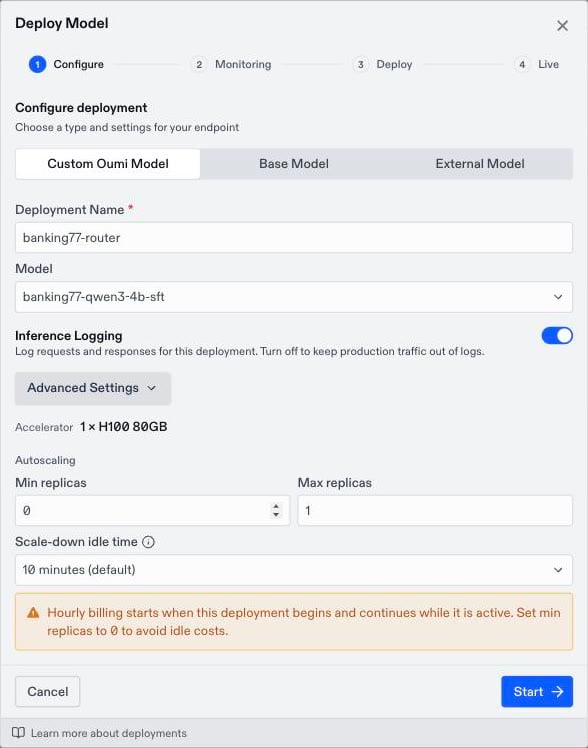
AUTOSCALING
A custom or base deployment runs on replicas, and each replica bills by the GPU-hour while it runs. Autoscaling decides how many replicas run, so it sets both your cost and how fast the deployment responds.
Choose the settings for your traffic:
- Occasional or test traffic: Keep min replicas at 0. The first request after an idle period waits a few minutes while a replica starts. See Cold starts.
- Steady traffic, or users who can’t wait for a cold start: Set min replicas to 1. That replica runs and bills continuously.
- Concurrent traffic that queues: Raise max replicas. Extra replicas bill only while they run.
- Bursty traffic: A longer idle time keeps a replica warm between bursts and bills for the idle minutes. A shorter idle time saves cost but causes more cold starts.
DEPLOY AUTOMATICALLY AFTER TRAINING
In the Run Training Job dialog, checkAuto-deploy this model when training completes. When training finishes, Oumi deploys the model with scale-to-zero autoscaling. The option is unavailable when the base model and training method you chose can’t be deployed.
DEPLOYMENT STATUSES
CHANGE OR DELETE A DEPLOYMENT
You can change these settings after you create a deployment:
You can’t change a deployment’s type, model, accelerator, provider, or API key. To serve a new model version or use a different key, create a new deployment and point your application at its deployment path.
A deployment can’t be paused. To stop paying for an idle custom or base deployment, set min replicas to 0.
To delete a deployment, open its menu and select
Delete. Deleting removes the endpoint, and it can’t be undone.